

Published November 11, 2026 · 4 minute read
List Perfectly AI Batch Mode is built for photo sessions where each item in the group uses the same number of images. Set the photo count once, and List Perfectly automatically separates the larger photo session into equal sets before Listing Assistant AI creates the listings.
For resellers with inventory that fits a predictable photo process, that means less manual sorting and a faster path from photos to listings.
Use Batch Mode for Photo Sessions With the Same Number of Photos Per Item
Batch Mode works best when a reseller’s photo session follows a consistent pattern.
For example, a reseller may photograph every item with the same number of images: front, back, brand or size tag, condition details, and any other views they use regularly. Once the photo count is set, List Perfectly AI can automatically group the photos into separate listings based on that number.
That makes Batch Mode especially useful when a reseller has a repeatable photo process and wants to move through a larger photo session without manually separating every item into its own group.
The workflow does not have to define how the reseller photographs every type of inventory. It simply gives resellers a faster option for the photo sessions where using the same number of photos per item makes sense for their business.
Set the Photo Count Once and Let Batch Mode Do the Grouping
With Batch Mode, the reseller chooses how many photos belong to each item, and List Perfectly automatically separates the photo session into equal groups.
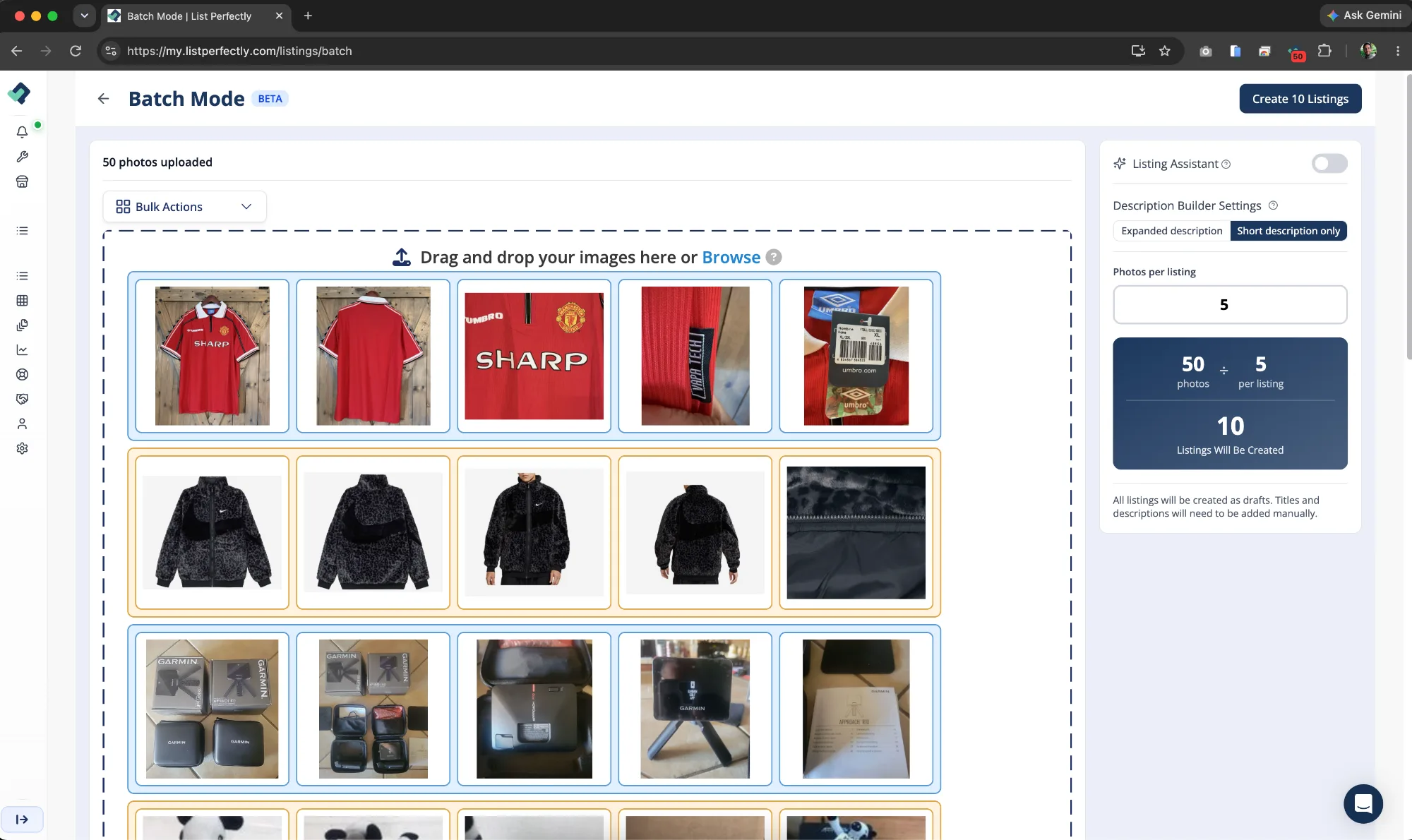
For example, if every item in the session has 5 photos, Batch Mode groups the images in sets of 5. A photo session with 100 images becomes 20 separate photo groups without the reseller having to sort each item manually.
Once the groups are created, List Perfectly AI uses each photo set to create its own listing. The reseller controls the photo count, while Batch Mode handles the repetitive grouping work across the entire session.
Create Large Groups of Listings From One Batch Photo Session
Batch Mode is especially useful for resellers whose inventory works well with a predictable number of photos per item.
A reseller may organize a photo session so every item receives the same number of images, or regularly sell inventory that naturally requires a consistent photo set. New-with-tags or new-without-tags clothing, video games, and other similar inventory can fit this workflow well because each item may need the same standard group of photos.
That consistency allows the reseller to photograph inventory in one larger session, set the photo count, and let List Perfectly AI separate those images into equal groups and create the listings.
Batch Mode does not require every part of a reseller’s business to follow the same photo process. It gives resellers an efficient option whenever a particular group of inventory fits a consistent photo workflow.
Frequently Asked Questions About List Perfectly AI Batch Mode
Batch Mode is designed for photo sessions where each item uses the same number of photos. If different items need different photo counts, Bundle Mode or Sequential Mode may fit that photo session better.
With List Perfectly AI Bundle Mode: Turn Mixed Photos Into Listings Fast, resellers create custom photo groups so one listing can have a different number of images from another.
No. Batch Mode uses Listing Assistant AI, so listings created with AI count toward the monthly AI allowance included with the reseller’s List Perfectly plan.
The amount of listing information AI can create also depends on the listing fields included with that plan.
No. Batch, Bundle, and Sequential are AI Bulk Listing modes and are not available on the Simple plan. The Simple plan creates AI listings one at a time.
No. AI Batch Mode is not available on the Simple plan. Resellers who want to create larger groups of listings with Batch Mode need a List Perfectly plan that includes AI Bulk Listing