
Need help after signing up for List Perfectly? After signup and payment are complete, the List Perfectly Onboarding Assistant launches to guide new members through the most important first steps, including setting up the List Perfectly technology and choosing how to begin listing, crosslisting, and managing inventory.
For most resellers with active marketplace listings, importing into the unlimited List Perfectly Catalog is the recommended foundation. It creates one central place to organize listings, prepare inventory for crosslisting, and manage inventory.
Importing is not required. List Perfectly also lets resellers crosslist directly between supported marketplaces without importing first or create new listings inside List Perfectly.
Resellers using the List Perfectly Catalog can manage inventory inside List Perfectly. Direct crosslisting without the Catalog requires a separate inventory-management system.
This List Perfectly guide explains what to do first after signing up for List Perfectly and connects new members to the next demos, guides, and live support options.
Start With the List Perfectly Onboarding Assistant
The List Perfectly Onboarding Assistant opens automatically and helps members begin setting up their accounts. It guides the essential setup, while the Tasks tab keeps onboarding and account tasks available so unfinished steps can be revisited later.
List Perfectly is a complete reseller listing, crosslisting, and inventory-management system. The List Perfectly extension is one part of that technology and supports browser-based marketplace actions when needed.
Marketplace connections are used for Catalog-based crosslisting, inventory management, supported Poshmark tools, and other connected features. List Perfectly uses the store, shop, or closet name to identify the marketplace account and does not require the marketplace password or login email.
Resellers continue signing in directly to each marketplace and remain in control of reviewing and publishing listings. Marketplace connections inside List Perfectly are not required for direct marketplace-to-marketplace crosslisting.

Watch: Find and Use the List Perfectly Tasks Tab
https://www.youtube.com/watch?v=DNaxZPfIJzA
Members using a supported desktop or laptop browser can continue with the complete guide to installing, enabling, and pinning the List Perfectly extension.
How to Enable and Pin the List Perfectly Extension
https://listperfectly.com/tips/how-to-enable-your-list-perfectly-extension-in-google-chrome/
Choose How You Want to Start
List Perfectly supports three starting paths. Importing into the unlimited Catalog creates the clearest foundation for Catalog-based crosslisting and inventory management, while direct crosslisting and new listing creation provide flexibility when importing is not the right first step.
Import Existing Listings Into the List Perfectly Catalog
Every List Perfectly plan includes unlimited imports and an unlimited Catalog. Importing from the marketplace with the most active listings is often the most practical way to begin.
When several marketplaces contain the same listings, image quality may also guide the choice. Starting with eBay or Etsy may help preserve stronger listing photos because marketplaces such as Poshmark and Mercari may compress images.
Importing creates a central List Perfectly Catalog where listings can be reviewed, organized, crosslisted, and managed. Imports continue in the background, allowing members to keep working while the Catalog is being built.

Watch: Import Existing Listings Into the List Perfectly Catalog
https://www.youtube.com/watch?v=ZW1sGST7d7A
Continue with List Perfectly One Click Import: Unlimited on All Plans blog for the complete import workflow.
Crosslist Directly Between Marketplaces
Resellers can crosslist directly from one supported marketplace to another without importing into the List Perfectly Catalog first.
Crosslisting directly between marketplaces with List Perfectly helps expand reach and save time by eliminating the need to import listings into List Perfectly first. Marketplace connections inside List Perfectly are not required for this workflow.
Resellers remain signed in directly to each marketplace, review the transferred listing information, complete the destination marketplace requirements, and publish.
Resellers who do not use the List Perfectly Catalog will need another system, such as a spreadsheet or different inventory-management software, to manage inventory.
Create New Listings Inside List Perfectly
New or unlisted inventory can be created inside List Perfectly with Listing Assistant AI, Barcode Scanning, Express Lister, or the Full Listing Form. Bulk listing options are also available depending on the member’s plan.
Listing Assistant AI helps turn photos into listing content that the reseller can review, edit, and crosslist. Every saved listing should be reviewed before crosslisting, and the reseller remains in control of the final listing.
Review the List Perfectly Catalog
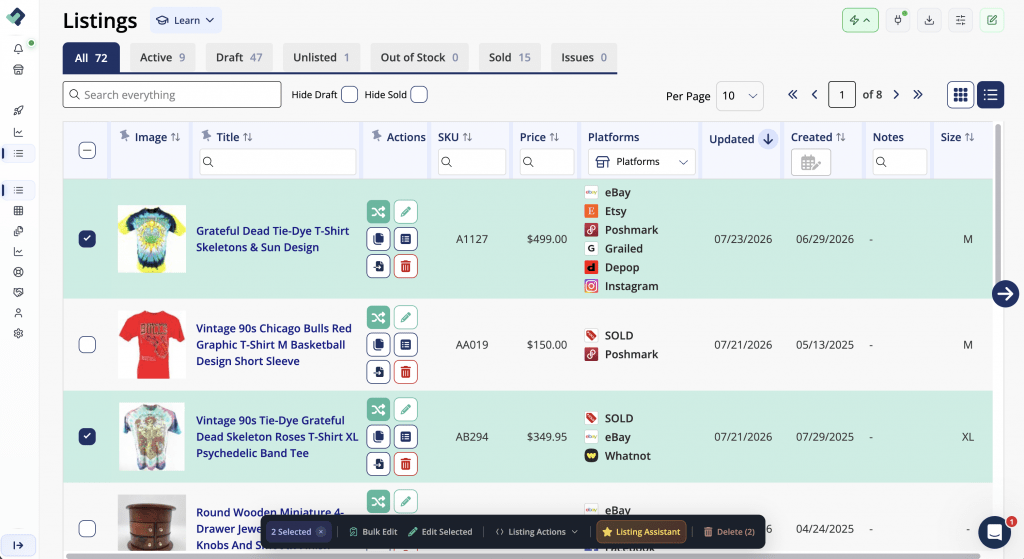
The unlimited List Perfectly Catalog gives resellers one place to organize listings, prepare inventory for crosslisting, and manage inventory across supported marketplaces.
Imported listings and listings created inside List Perfectly should be reviewed before crosslisting. Members can also customize the Catalog with Grid View or List View, adjustable columns, sorting, and filters.
Continue with the complete List Perfectly Catalog customization guide to personalize the view.
How to Customize Your List Perfectly Catalog View
https://listperfectly.com/tips/https-listperfectly-com-tips-customize-list-perfectly-catalog-view/
Learn the Many Ways to Get Help
List Perfectly members do not have to learn the system alone.
The built-in Help system provides 24/7/365 support through the smiley icon in the lower-right corner for account questions, workflow assistance, technical issues, and help when login is not possible. Support conversations do not time out. Members can also return to the Tasks tab to continue unfinished onboarding steps.
Join Customer Support 411 for Group Onboarding
New List Perfectly members who prefer live guidance can use Customer Support 411 as their group onboarding session.Customer Support 411 is held daily at 12 PM Eastern Time inside Listing Party. Members can follow along, ask questions, and learn directly with the List Perfectly team.
Watch how to join a List Perfectly group onboarding session
Learn more in List Perfectly Daily Live Onboarding: What New Members Can Expect.
Request One-on-One Assistance
Members who need individual help can use the smiley icon in the lower-right corner to contact the List Perfectly team and request one-on-one video assistance, including when they cannot log in.
Watch how to request one-on-one help from the List Perfectly team
Explore How to Get Help in List Perfectly: Human Support When You Need It for the full overview of support options.
Explore the Next Tools That Fit Your Business
After the initial setup, resellers can explore tools that match the next business task, including Unlimited features like Update, Delist and Relist, Templates, Bulk Listing, Sales & Analytics, Auto Delist, Device Manager, and Poshmark sharing, followers and offers.
Availability depends on the member’s plan. Each tool links to its dedicated and updated help guide for complete instructions.
Frequently Asked Questions
What should a reseller do first after signing up for List Perfectly?
After signup and payment, the List Perfectly Onboarding Assistant launches to guide the essential setup and help the member choose how listings, crosslisting, and inventory management will be handled.
Is importing required before crosslisting with List Perfectly?
No. Resellers can crosslist directly between supported marketplaces without importing first. Importing is the recommended foundation for many resellers because it creates a central Catalog for listings and inventory management.
Why import listings into List Perfectly?
Importing creates an unlimited List Perfectly Catalog where resellers can organize listings, crosslist, connect matching marketplace listings, and use applicable inventory-management tools. Every List Perfectly plan includes unlimited imports and an unlimited Catalog.
Do marketplaces have to be connected to use List Perfectly?
Not for every workflow. Marketplace connections are not required for direct marketplace-to-marketplace crosslisting.
For Catalog-based crosslisting, inventory management, supported Poshmark tools, and other connected features, List Perfectly uses the store, shop, or closet name to identify the account. List Perfectly does not require the marketplace password or login email.
Does List Perfectly offer human help and onboarding?
Yes. List Perfectly provides 24/7/365 support through the built-in Help system, guided Tasks, group onboarding sessions, one-on-one video assistance, Customer Support 411, instruction guides, demo videos, blogs, feature walkthroughs, and the Guide to List Perfectly.
Final Thoughts
The unlimited List Perfectly Catalog gives many resellers a strong foundation for organizing listings, crosslisting, and managing inventory.
List Perfectly also provides the flexibility to crosslist directly between supported marketplaces without importing first or create new listings inside List Perfectly. The Onboarding Assistant, linked guides, demos, and live support options provide the next step whenever more help is needed.